

George Brown Polytechnic is located on the traditional territory of the Mississaugas of the Credit First Nation and other Indigenous peoples who have lived here over time. We are grateful to share this land as treaty people who learn, work and live in the community with each other.
Welcome to the resource page about Brightspace’s New Content Experience (NCE).
Below you will find some general information about NCE as well as links to instructional guides.
What is the New Content Experience (NCE)?
GBP’s Brightspace will transition to the New Content Experience (NCE), D2L’s most up-to-date offering, designed to simplify how instructors create, organize, and present course content.
Note: The transition to NCE only affects content creation and display in Brightspace. All other Brightspace tools (Announcements, Assessments, Discussions, Grade Book, etc.) remain unchanged.
How is NCE different from the Classic experience I’m currently using?
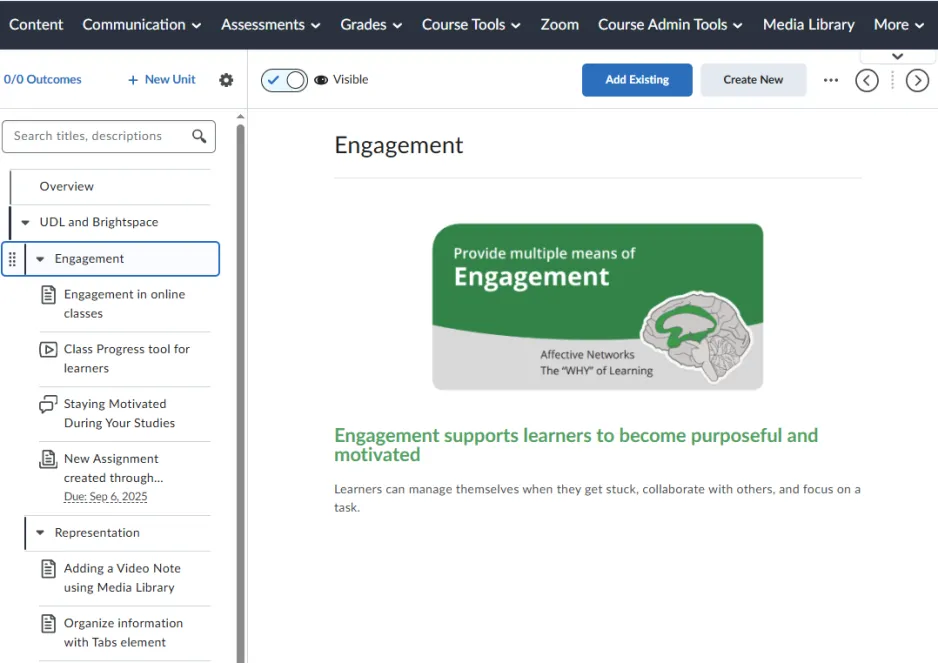
NCE features inline viewing, drag-and-drop uploads, and visual enhancements. It replaces the folder-style layout with a card-based, modular format.
What You Can Expect:
- A more visual interface for learners and instructors.
- New terminology for content organization and structure.
- Ability to collapse and expand folders in the Table of Contents column.
When can I see NCE in my course?
Starting this Fall, you will have the ability to toggle between the Classic View and New Content Experience, so that you can compare and become familiar with the NCE interface in a quick step.
Note: We highly recommend exploring the New Course Experience (NCE) using an older course shell or a development shell, rather than your live Fall course shell. This approach helps reduce confusion and ensures students have a consistent experience across their courses.
The full transition to NCE will happen gradually. Please see timeline below.
- Fall 2025: The ability to toggle between the New Content Experience and the Classic Experience will be available with classic as the default for September 2025. (Rest assured that there will be no change to your courses in the Fall 2025 semester).
- Winter 2026: NCE default with ability to toggle between NCE and classic.
- Spring 2026: NCE default. Classic toggle no longer available.
How do I switch between NCE and Classic experience?
There is a toggle option available in the Content section of your course. The toggle option, represented by a tab with a downward chevron, is located below the More button on the navigation bar. When you select the tab, you will be given an option to switch between NCE and Classic.

What happens to my existing course content if I switch to NCE?
All existing content stays intact. The change is visual only, and your modules and files are preserved. However, you may need to review the organization of your content and make visual adjustments as necessary.
Will I need to migrate or reupload my course content to Brightspace?
There is no course migration or transfer necessary. Your courses are either in NCE or in Classic.
Can students switch between NCE and Classic view of the content?
Students cannot choose between NCE or Classic experience as the view is based on the instructor’s settings. To ensure consistency for students, we recommend exploring the New Course Experience (NCE) using an older course shell or a development shell.
Below are links to step-by-step guides showing you how to work in the Content section of your course using the New Content Experience.
Switching between NCE and Classic view
Learn where to find the toggle to switch between NCE and Classic.
Adding new content in NCE
Adding Assignments and Activities in NCE
Learn how to add and view assignments and existing activities in your content section.
Editing a content page
See where to find the edit button to make changes to your content page.
Organizing and naming content folders
Learn tips on how to organize your content folders using NCE’s structure and naming convention