

George Brown Polytechnic is located on the traditional territory of the Mississaugas of the Credit First Nation and other Indigenous peoples who have lived here over time. We are grateful to share this land as treaty people who learn, work and live in the community with each other.
Accessible accommodations (such as screen readers, additional time, etc) are available for admission (mature student) or placement assessments. To receive these accommodations, you must first register with Accessible Learning Services (ALS). Accommodations cannot be provided unless you have registered with ALS and have made an appointment to write with the Assessment Centre.
Both ALS and the Assessment Centre use the program Accommodate for requesting and managing student accommodations. Once you are registered with ALS, you can do the following in Accommodate:
- Book your quizzes/texts/exams with the Assessment Centre.
- Cancel your accommodated testing appointments.
If you need further assistance with booking appointments, you can also email, call, or visit the Assessment Centre at your home campus location.
Booking and cancellation instructions for students
Booking instructions for new applicants and students (admission and placement assessments)
The Assessment Centre requires advance notice to arrange testing accommodations. Once you’re registered with ALS, please book your appointment at least seven days in advance of the test date.
All accommodated admission and placement tests take place at our St. James campus.
Steps to book your admission/placement assessment with accommodations:
- Register with Accessible Learning Services.
- Wait two business days
- Email the Assessment Centre at booktest@georgebrown.ca
- Be prepared to provide:
- Your name
- Student identification number
- Daytime telephone number
- Your desired date for testing
Please note that we require at least 7 days’ notice to arrange accommodations. All accommodated admissions & placement testing take place at our St. James location.
Returning Students - Booking your Class Test/Exam
The Assessment Centre requires notice to arrange testing accommodations. Please book your testing appointment at least seven days in advance of the test date.
Students are required to use the Assessment Centre at your home campus for all your testing accommodations.
Please have the following information prior to booking: student ID number, course code/name, test date, name of the test.
How to Book using the Accommodate Portal:
- Log into the Accommodate Portal using your GBP log-in (studentID@georgebrown.ca) and password. Select the Student user type.
- From the menu, select Assessment Centre Booking.
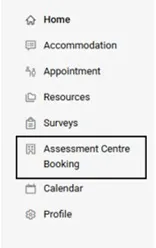
The Assessment Centre Booking option will only show up if you have testing accommodations as part of your accommodation plan. - In the Assessment Centre Booking section, you will have the option to view Pending test booking requests that you have already submitted and any Approved requests for upcoming tests.
To book a new test, click on the New Booking Request button.

- Select the relevant course from the drop-down menu, and complete the information about your test.
- Enter the date of the exam in both boxes.
- Select your home campus.
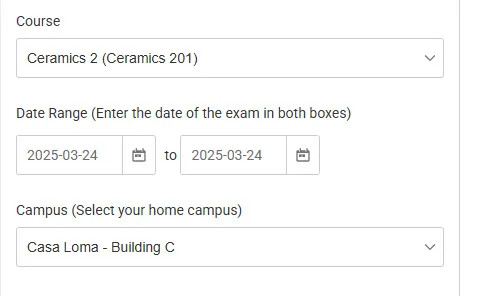
If you are not sure of the above information, you can confirm the date with your instructor.
Note: If you are booking a test outside of the regular class time, you will need to get permission from your instructor first.
- Click on the Check Availability button at the bottom of this form. You will see all available time slots for this date and location on the right-hand side. Clicking on a time slot will open up the Confirm Exam Booking form.
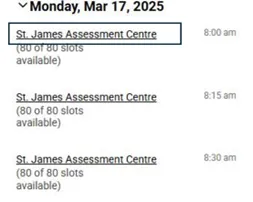
- Complete the required information in the Confirm Exam Booking form and click Submit Request.
- Once your booking request gets approved, you will receive a confirmation email to your GBP email address with your testing details. Please allow 48-72 hours for this response.
Please note, students who arrive late for their test must email their professor and the Centre as testing may be rescheduled.
Cancelling your Testing Appointment
If you can no longer attend your scheduled appointment, you need to cancel it in Accommodate up to 24 hours beforehand. If you need to reschedule, please cancel and then rebook.
Steps to cancel your accommodated appointment:
- Login to the Accommodate Portal using your GBP account (studentID@georgebrown.ca) and password. Select the Student user type.
- From the menu, select Assessment Centre Booking.
- Under Pending Booking Requests, you can view any pending or approved testing appointments. Select the three dots to the right of your specific appointment and then select Cancel.

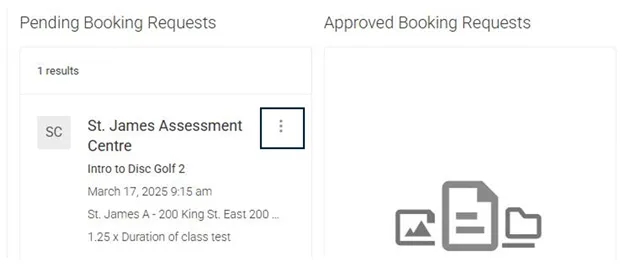
- If you need to reschedule your test booking, please cancel and rebook.
Students will be able to cancel your appointment up to 24 hours before your scheduled time using the Accommodate Portal.
If you require any assistance with booking your accommodated test, please reach out to the Assessment Centre at your home campus: Assessment Centre hours & locations.