

George Brown Polytechnic is located on the traditional territory of the Mississaugas of the Credit First Nation and other Indigenous peoples who have lived here over time. We are grateful to share this land as treaty people who learn, work and live in the community with each other.
Need Testing Accommodations?
You may be eligible for testing accommodations such as extra time, the use of screen readers or assistive technology, or a reduced-distraction testing area.
Accommodations are available for:
- Admissions testing (mature students)
- Placement testing (new students)
- Class tests/exams (current students)
Important: You must first register with Accessible Learning Services (ALS) before booking any test accommodations. Accommodations will not be provided unless you have registered with ALS and have made an appointment to write with the Assessment Centre.

Booking Instructions for Admission and Placement Tests (Applicants & New Students)
Before you book
Book your testing appointment at least seven (7) days in advance, so we can arrange your accommodations.
All accommodated admission and placement tests take place at the St. James Campus location.
Instructions
- Register with Accessible Learning Services
- Wait two business days
- Email the Assessment Centre at booktest@georgebrown.ca
- Be prepared to provide:
- Your full name
- Student ID number
- Phone number
- Your preferred date for testing
The Assessment Centre will email you to confirm your testing date and time.
Booking Instructions for Class Tests & Exams (Current Students)
Before you book
- Book your testing appointment at least seven (7) days in advance, so we can arrange your accommodations.
- Students can book all their scheduled tests for their class at the start of the semester to avoid missing any booking deadlines.
- Students are required to use the Assessment Centre at their home campus for testing accommodations.
- Ensure you have the following information prior to your booking: student ID, course code/name, test date/time, and the name of the test as it appears on your course outline or from your instructor (ex. Midterm, Quiz 3).
- Use the Accommodate Portal to book your tests with the Assessment Centre. This is the fastest and preferred method.
How to book through the Accommodate Portal
Log in to the Accommodate Portal
Use your George Brown credentials (studentID@georgebrown.ca) and password and select the Student option.
Step 1: Start a booking
Select Assessment Centre Booking from the left-hand menu
Note: This option will only appear if you have testing accommodations in your accommodation plan.
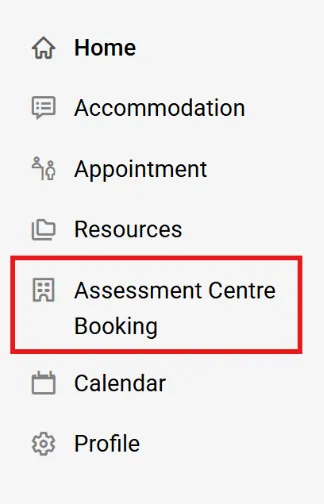
The Assessment Centre Booking window will show the following options:
- Pending Booking Requests: requests to be approved by the Assessment Centre
- Approved Booking Requests: confirmed test bookings
- New Booking Request
To book a new test, select New Booking Request

Step 2: Enter your details
Complete each step:
Course
- Select your course
- Select Next Step
Date
- Select the exact date of your in-class test
- Only test days at least seven days in advance will appear.
Location and Time
- Select your home campus
- Choose a start time that matches your class test time or the time provided by your instructor
Time slots are in 15-minute intervals
The default test length is 60 minutes. The Assessment Centre will update the duration once it receives the test details from your instructor.
Step 3: Review and submit
- Select Request to review your booking
- Confirm that your test is scheduled during class time
- Do not book outside of class time without instructor approval
- Enter the test name exactly as provided by your instructor or course outline
- Select the testing accommodations you plan to use for this test
- Add notes for Assessment Centre staff (optional)
- Select Submit Request to complete your booking
After you submit your request
- The Assessment Centre will review your request
- Once approved:
- You will receive a confirmation to your George Brown email address
- Your instructor will be notified and receive your booking details.
Please allow 48-72 hours for this confirmation.
Cancelling your Testing Appointment
You may cancel a confirmed booking up to 24 hours before your test.
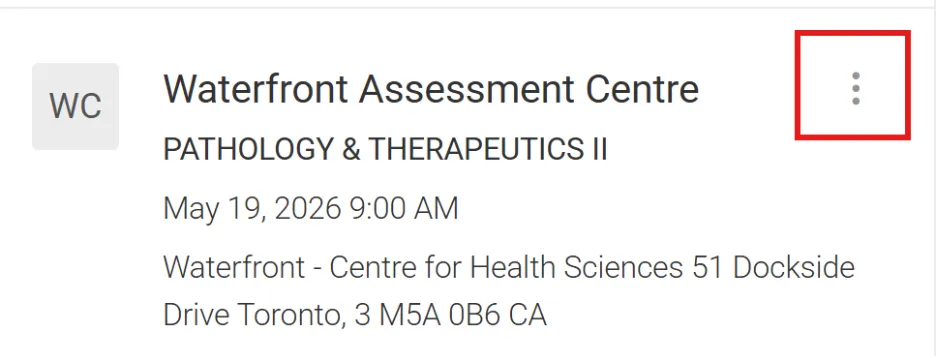
- Go to Approved Booking Requests
- Find your booking
- Select the three dots in the top-right corner
- Select Cancel
What to Expect During your Test Session
What do I need to bring?
Students are expected to bring the following to their testing session:
- Valid (non-expired) photo ID
- Only approved materials and devices as part of your accommodation plan or instructor’s approval
- Your own pencils/pens, calculators, or scrap paper, if permitted.
Important rules
- Arrive at least 5 minutes early to check in
- Turn off and store all electronics
- Store personal belongings in lockers or designated areas
- Only approved items are allowed in the testing area
Visit our Academic Integrity procedures page to learn what you can expect in our testing environment.
Extra Help and Resources
Have questions?
Reach out to the Assessment Centre at your campus if you have questions about accommodated testing or booking.
How can I prepare for my admissions and placement tests?
Visit our Preparation and Resources Page for helpful information to support your test preparation.
Need help using Accommodate?
If you want more assistance with the Accommodate Student Portal, PeerMentor+ provides individualized support for students using Accommodate, Brightspace, Stu-view, and the Pigeon Messenger App. Drop in to the Calm Zone at 200 King Street E, Room B121, or book a time to meet with a student mentor at your campus or online.