

George Brown Polytechnic is located on the traditional territory of the Mississaugas of the Credit First Nation and other Indigenous peoples who have lived here over time. We are grateful to share this land as treaty people who learn, work and live in the community with each other.

Report Phishing or Suspected Phishing
You can report phishing or suspected phishing emails and junk emails within Outlook. Doing so will notify Microsoft and George Brown Polytechnic's cyber security team simultaneously.
Phishing emails are designed to obtain your personal information. They do this by impersonating popular websites or including malicious links in the body of a message.
Follow the steps below to report phishing or junk mail.
Click report button
Click the “Report Message” button in Outlook.

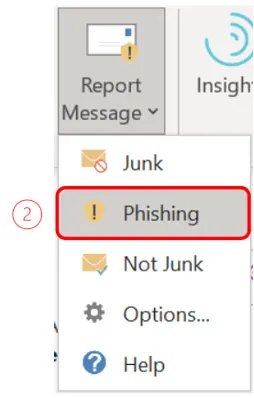
Select 'Phishing'
Select Phishing and click Report. If the message is junk mail, click Junk instead.
Report the message
Outlook will prompt you to report the message.

Questions?
Contact the Cyber Security team at cybersecurity@georgebrown.ca or call the Help Desk at 416-415-5000 ext. 4357.